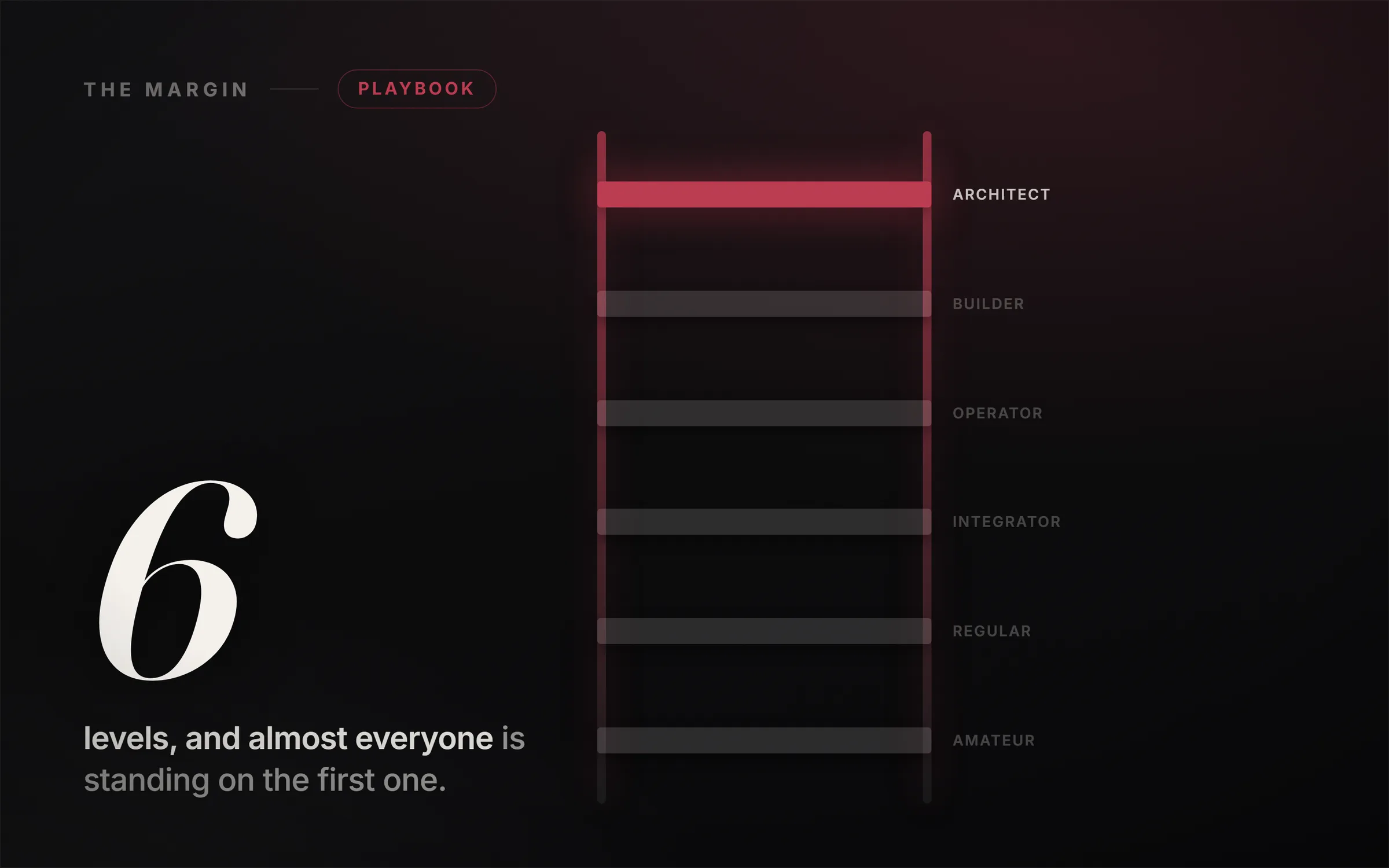
Most people use Claude at level one: they type a question, get an answer, and start from zero again tomorrow. That is a fraction of what the tool does. There are six levels of using Claude, and they climb from a smarter search box, up through a workspace that remembers your business, tools that reach your real data, workflows that run themselves, software Claude ships for you, and finally an agent system that operates a whole process while you sleep. Each level is built on the one below it, so the fastest way to get more out of Claude is to find the rung you are on and take the single move up.
I am writing this from inside the bet. We built IdeasRepay as a cold start with no audience, running these tools every day, so this is a map I actually climb, not a list assembled by someone who has never opened Claude. Every capability below is real and current as of 2026, and I cut two numbers that were floating around this topic because I could not verify them. The one big stat I do keep is published by Anthropic itself.
In the video I climb all six levels on screen with a live-typed Claude, so you can watch each level-up actually happen. This written guide stands on its own and goes deeper on what each level unlocks and the exact move that takes you up. Read it, watch it, or both.
What are the 6 levels of using Claude?
Think of it as a ladder where every rung unlocks the next. The levels are not features to memorize; they are a map of leverage. At the bottom, you do all the work and Claude helps you type. At the top, you do none of the work and Claude runs a system you designed. Most people never climb past the first rung or two, not because the higher levels are hard, but because nobody ever showed them the map. Here it is.
Level 1: The Amateur (Claude as a smarter search box)
Level one treats Claude like a fancy Google. You type a question, you get an answer, faster than a web search. It is genuinely useful, and it is also the smallest slice of what the tool can do, because nothing compounds. Tomorrow you open a blank chat and start from zero again.
The move up is two sentences, and they are the most valuable two sentences in this whole article because you reuse them at every level above this one. First, before Claude answers anything real, tell it: "Before you answer, ask me any questions you need to do this properly." Instead of guessing, it interviews you, and the answer it gives after four sharp questions is a different class of output. Second, once it has answered, tell it: "Now check your own work." It flags its own weak lines and rewrites them, visibly better. Same tool, no new skill, completely different result. Pause here and put both sentences at the top of a note. That is move number one.
Level 2: The Regular (Claude as a workspace)
Level two stops throwing away everything you tell it. You create a Project, which is a persistent workspace with its own custom instructions (your "master prompt") and an uploaded knowledge base (up to 20 files on Pro, Max, and Team plans). Now Claude remembers who you are, what you sell, and how you talk. Every chat inside that Project starts with your business already baked in, so you never paste your background in again.
The move up: name the Project after a role rather than a topic, for example "Head of Marketing, [your brand]." Then, using move number one, ask Claude to interview you to write the master prompt for that role, and drop in one or two real files (your offer, your voice samples, a past piece of work). Open a fresh chat, ask a real task, and watch it answer already knowing the voice, the offer, and the audience. Alternatives if you are not on Claude: ChatGPT calls these "Custom GPTs" and Gemini has "Gems," with the same idea and slightly different limits.
Level 3: The Integrator (Claude reaches your real data)
Level three plugs Claude into where the work actually lives. Through connectors (built on MCP, Anthropic's open standard), Claude reaches Gmail, Google Drive, Google Calendar, Slack, Notion, GitHub, Asana, and hundreds of other tools. Now it does not guess from memory. It goes and gets your real data and builds with it. Ask it to pull last week's numbers from a connected sheet and chart them, and it fetches the real rows, then renders a live Artifact chart in a side panel. Artifacts also build interactive things: mockups, mini web apps, diagrams, even a small working tool from a screenshot.
The move up: connect one tool you use daily, then stop exporting and pasting between five tabs. Let Claude go get the data itself and build the chart or the mockup in the chat. This is the level where Claude stops being a text box and starts being a workbench. A word of care: connect read-only or low-stakes sources first while you learn what it touches, and review anything it drafts before it goes anywhere.
Level 4: The Operator (the work runs, you direct it)
Level four is the line where it stops being you using Claude and becomes Claude doing the work. You build a Skill, which is a saved procedure (a SKILL.md file plus optional scripts and templates) for a task you do over and over. Skills 2.0, which shipped in early 2026, can run scripts, generate real files, and produce finished deliverables, not just text, and Anthropic ships pre-built Skills for Excel, PowerPoint, Word, and PDF work. Better still, Skills are composable: you chain them so one Skill's output feeds the next, and a whole pipeline runs end to end. Dynamic Workflows, added in mid-2026, extend this to fanning work out across many steps at once.
The move up: build one Skill for your single most repetitive task, then chain a second onto it. If the process lives only in your head, use move number one and let Claude interview you to document it first. This is the moment a workflow leaves your hands for good, and it is exactly the kind of automation that businesses pay real monthly retainers for. I mapped the honest version of that service in 7 Claude AI Side Hustles That Actually Pay.
Level 5: The Builder (Claude ships software)
Level five: Claude stops using software and starts shipping it. Claude Code, Anthropic's agentic coding tool, reads files, runs commands, edits code, and builds the internal tools your business actually needs (the dashboard, the little app, the automation) with no developer and no waiting. And Claude for Chrome, the browser agent now in beta on paid plans, does the work on any website: you write the instructions once and it navigates, clicks, types, and fills the forms for you.
The move up: describe one small internal tool you have always wanted (a quote calculator, a simple dashboard, a form that actually submits) and let Claude Code build it, then open it working in your browser. It goes from a sentence to a real tool you can use in minutes. This is the level where "I am not technical" stops being a wall. The path from a first tiny build to something you can charge for is the whole point of Make Money Vibe Coding.
Level 6: The Architect (the business that runs itself)
The top level. You stop doing the work, and you stop even directing it. You design a system that directs itself: one orchestrator agent that acts as the CEO of the operation and assigns the work, a set of specialized sub-agents that each own one job and run in parallel, and a critique agent that checks every output before it ships. You build it once, then you let it run.
This is not a theory I am selling you. It is how Anthropic's own team builds. Their multi-agent research system uses exactly this shape (a lead agent that spawns parallel sub-agents, plus a citation and grading layer), and here is the published result:
A multi-agent system with Claude Opus 4 as the lead agent and Claude Sonnet 4 subagents outperformed single-agent Claude Opus 4 by 90.2%.
One agent directing a team of agents beat their single best model by ninety percent. That is the whole idea of level six: the machine that runs the machine. And regular users can build this too, through Claude Code sub-agents (defined in a .claude/agents folder) and the grader loop in Dynamic Workflows, which sends each sub-agent back to revise until its work meets a rubric.
Which level of Claude are you on?
Be honest with yourself, because the answer tells you your next move. If you open a blank chat every time and re-explain who you are, you are on level one, and your next move is a Project. If you have Projects but still copy and paste data between tabs, you are on level two heading for three, and your next move is a connector. If your real bottleneck is a task you do fifty times a month by hand, you are ready for level four and a Skill. The point of the map is not to leap to level six. It is to climb one honest rung from wherever you actually are.
And a warning that matters more than any feature: a machine that runs itself will happily run the wrong business perfectly. Before you build any of this, the decision that actually determines whether it is worth building is which system makes money in your niche. Automation multiplies whatever you point it at, including a bad idea.
How to turn the climb into a business
Every level maps to a service someone will pay for. Level three (plugging AI into a business's real tools) is the foundation of a local AI chatbot or AI receptionist business. Level four (automated workflows) is what automation agencies sell as monthly retainers. Level five is software you can build and sell without being an engineer, and level six is a connected team of agents you can run for a brand. The common thread is that the money is never in the prompt; it is in owning an outcome for a specific client. I make that argument in full in The Moat Moved, and the build-it-out walkthroughs for each of these live in the library at ideasrepay.com.
So there is your map. Look at where you honestly are, take the single move up, and climb one rung this week. Most people will read this and stay on level one. That, as always, is your advantage.